



When customers call a business, their first interaction is often with an automated phone system. They may hear a welcome message, choose a department, check business hours, or follow instructions before speaking to an employee.
These automated phone menus are commonly known as Interactive Voice Response (IVR) systems.
Traditionally, businesses used human-recorded voice messages for these phone menus. Whenever a company changed its opening hours, introduced a new service, or updated its instructions, it might need to record and replace several audio files.
AI voice technology offers another option. Businesses can use text-to-speech to turn written phone prompts into spoken audio without recording every message manually.
This can make it easier to prepare, update, and manage voice prompts. However, an AI-generated voice is not the same as a complete IVR system. The phone system still needs to manage incoming calls, keypad selections, call routing, and connections to customer support teams.
In this guide, we will explain how AI voices are used in IVR and business phone systems, their practical benefits and limitations, how to prepare professional phone prompts, and what businesses should consider before setting up an AI voice solution.
What is an IVR System?

IVR stands for Interactive Voice Response. It is an automated phone system that interacts with callers and helps direct them to the right service or department.
You have probably used an IVR system when calling a bank, hospital, telecom company, delivery service, or customer support centre.
For example, when you call a company, you might hear:
“Thank you for calling ABC Services. For sales, press 1. For customer support, press 2. For billing enquiries, press 3. To speak with our reception team, press 0.”
You select an option using your phone keypad, and the system responds according to your selection.
How does an IVR system work?
A basic IVR process usually follows these steps:
- Incoming call: A customer calls the company’s business phone number.
- Welcome message: The system plays a greeting or introductory message.
- Menu options: The caller hears available options.
- Caller selection: The caller presses a number on the keypad or follows another supported interaction method.
- Call routing: The phone system directs the call to the appropriate department, queue, or service.
- Further assistance: The caller receives information, waits for an agent, or follows another menu.
The exact setup depends on the phone platform and the business requirements.
A simple example
Imagine a healthcare clinic that receives calls for appointments, reports, billing, and general enquiries.
Its IVR menu could look like this:
| Key pressed | Department |
|---|---|
| 1 | Book an appointment |
| 2 | Laboratory reports |
| 3 | Billing enquiries |
| 4 | General information |
| 0 | Reception |
The IVR system helps callers select the right department without requiring a receptionist to answer every call manually.
What is AI Voice for IVR?
AI voice for IVR refers to using artificial intelligence-based speech generation to create spoken messages for automated phone systems.
Instead of recording every phone prompt with a human speaker, a business can prepare the message as text and convert it into audio using a text-to-speech tool.
For example, a company might need the following announcement:
“Our customer support team is currently unavailable. Our working hours are Monday to Saturday, from 9 AM to 6 PM. Please call again during business hours.”
The business can prepare this message as written text and generate an audio version using a suitable AI voice.
That audio can then be added to a compatible phone system.
AI voice prompts and AI voice agents are different
It is important to understand two related but different technologies.
AI-generated IVR voice prompts
These are audio messages created from written text. They may include welcome messages, menu instructions, announcements, and waiting messages.
The phone system plays the audio when a particular event occurs.
Conversational AI voice agents
These systems can interact with callers more dynamically. Depending on their configuration, they may understand spoken questions, respond to requests, collect information, and transfer calls.
A conversational voice agent involves more than generating speech. It may require speech recognition, language understanding, business logic, integrations, and telephony connectivity.
For example:
- A standard AI voice prompt says, “For sales, press 1.”
- A conversational AI agent might ask, “How can I help you today?” and respond to the caller’s spoken request.
A business does not necessarily need a conversational AI agent to use AI-generated voices in its existing IVR system.
How AI Voice Works in Business Phone Systems
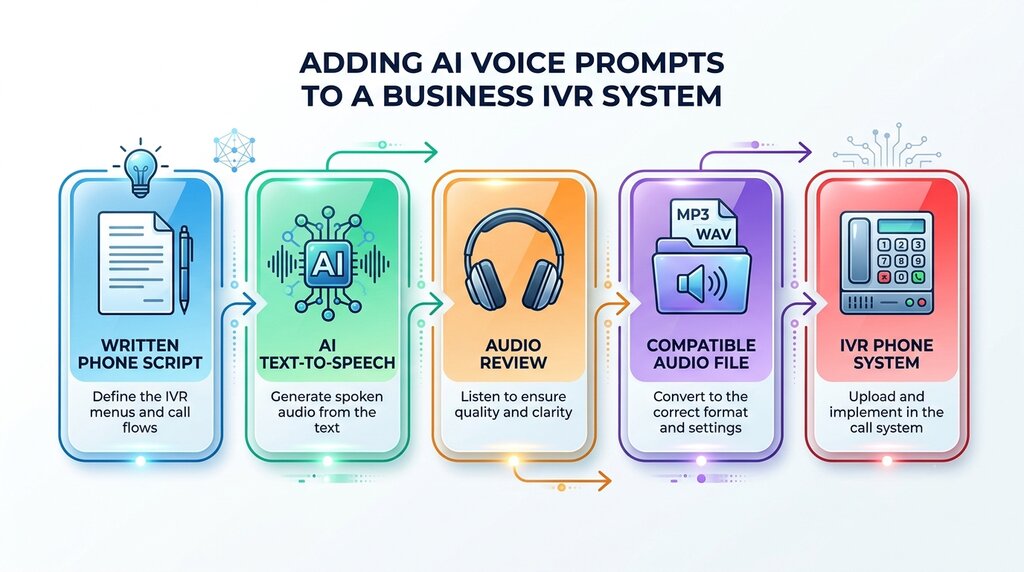
AI voice technology can be used at the audio-generation stage of an IVR workflow.
The process generally involves preparing written messages, generating audio, reviewing the result, and adding the files to a compatible phone system.
Here is how the process works.
Step 1: Prepare the phone message
The business decides what callers should hear.
Examples include:
- Welcome greetings
- Department menu instructions
- Business-hour announcements
- Holiday notifications
- Call waiting messages
- Out-of-office messages
- Service updates
The wording should be clear and suitable for spoken communication.
Step 2: Convert text into speech
A text-to-speech service converts the written message into an audio file.
The business selects a voice and, where supported, adjusts settings such as speech speed, pitch, and volume.
Step 3: Review the generated audio
Before using the file, listen carefully.
Check whether the voice pronounces department names, phone numbers, business names, and abbreviations correctly.
A message that sounds natural in a preview may still need adjustments when played over a telephone connection.
Step 4: Export the audio in a compatible format
The generated file must meet the requirements of the business phone system.
Different PBX, VoIP, and cloud telephony platforms support different audio formats, sample rates, and channel configurations.
Do not assume that every downloaded audio file can be uploaded directly.
Step 5: Upload the prompt to the phone system
The administrator adds the audio file to the IVR or phone platform and connects it to the appropriate call-flow step.
For example, the welcome greeting may play immediately after a customer calls.
Step 6: Test the complete call flow
Call the business number from an external phone and test the full experience.
Check whether the message is clear, keypad options work correctly, and calls reach the intended departments.
Common Business Uses of AI Voice in IVR
AI-generated voice prompts can be useful for businesses that receive regular customer calls.
The type of message depends on the company’s services and the questions callers commonly ask.
1. Welcome greetings
A welcome greeting is often the first message customers hear.
For example:
“Thank you for calling Brightline Technologies. We appreciate your call. Please listen carefully to the following options so we can direct you to the right department.”
A clear greeting helps customers understand that they have reached the correct business.
2. Department selection menus
Businesses with multiple departments can use automated menus to direct calls.
For example:
“For sales enquiries, press 1. For technical support, press 2. For accounts and billing, press 3. To speak with our reception team, press 0.”
The voice should pronounce each option clearly and leave enough time for the caller to respond.
3. Business-hour announcements
A company may receive calls outside its regular working hours.
An automated announcement can explain when the business will be available.
For example:
“Thank you for calling. Our office is currently closed. Our regular working hours are Monday to Friday, from 9 AM to 5 PM. Please call us again during these hours.”
This can reduce confusion among customers trying to reach the company.
4. Holiday and temporary closure messages
Businesses sometimes change their operating hours during festivals, holidays, maintenance periods, or special events.
Instead of recording a new announcement manually, the team can prepare an updated script and generate another voice prompt.
For example:
“Our office will remain closed on 14 November due to a scheduled holiday. Regular services will resume on the following working day.”
Make sure the date is correct before activating the announcement.
Traditional IVR Recording vs AI-Generated Voice
Businesses have traditionally used professional voice artists or employees to record IVR announcements.
AI text-to-speech provides another way to produce these messages.
Neither approach is automatically better in every situation. The right choice depends on the company’s budget, update frequency, brand requirements, and expected audio quality.
| Comparison factor | Traditional voice recording | AI-generated voice |
|---|---|---|
| Recording process | Requires a person to record the script | Converts written text into speech |
| Message updates | May require another recording session | Can generate a revised audio file |
| Voice selection | Depends on the selected speaker | Depends on available AI voices |
| Consistency | Depends on recording conditions and speaker | Can maintain a selected voice across generated prompts |
| Production time | Depends on speaker availability and editing | Often faster for short, prepared messages |
| Custom delivery | Can provide human-directed performance | Depends on available voice controls |
| Technical setup | Audio still needs phone-system integration | Audio still needs phone-system integration |
| Human expression | Can offer natural human performance | Quality and expression vary by voice and tool |
When should a business choose traditional recording?
Traditional recording may be suitable when:
- The company requires a particular human voice.
- The brand depends heavily on personal communication.
- The script needs expressive or highly specific delivery.
- The organisation already has a professional recording workflow.
- The message requires a particular speaker’s authorised voice.
When should a business consider AI voice?
AI-generated voices may be useful when:
- The business frequently updates its announcements.
- It needs several short voice prompts.
- It wants to prepare messages in supported languages.
- It needs consistent narration across different phone menus.
- It wants to create or revise audio without arranging a new recording session every time.
For some businesses, a combination of both approaches may work best. Important brand greetings could use a professional human recording, while routine announcements could use AI-generated audio.
Limitations and Challenges to Consider
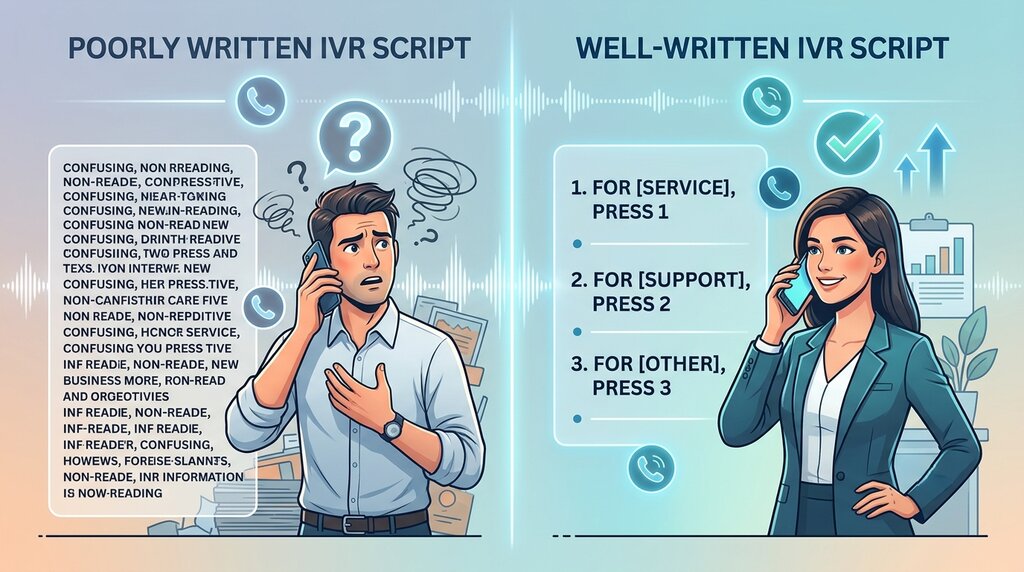
Although AI voices can simplify the creation of phone prompts, businesses should not assume that every generated message is ready for production.
There are several limitations worth considering.
1. Pronunciation errors
AI voices may mispronounce:
- Company names
- Employee names
- Product names
- Regional place names
- Technical terminology
- Abbreviations
A pronunciation mistake in a customer support menu can create confusion.
Always listen to the complete generated message before uploading it.
2. Voice quality over telephone connections
An AI voice may sound clear through computer speakers or headphones but less natural over a telephone line.
Phone systems may use audio codecs and bandwidth limitations that affect how a voice sounds.
Test the actual phone call rather than judging the audio only from the downloaded file.
3. Not every AI voice suits business communication
A voice that sounds expressive and entertaining may not be suitable for a bank, hospital, or professional support centre.
Choose a voice that matches the nature of the business.
For most informational IVR prompts, clarity is more important than dramatic expression.
4. AI voice does not manage calls by itself
This is an important limitation.
A text-to-speech tool creates audio from text. It does not automatically:
- Answer incoming phone calls.
- Detect keypad selections.
- Route calls to departments.
- Manage customer queues.
- Connect to a CRM.
- Handle customer complaints.
- Transfer calls to human representatives.
These functions belong to the IVR, PBX, contact-centre platform, or other connected systems.
How to Add AI-Generated Voice to an IVR System
The exact setup depends on your business phone provider and IVR platform. However, the general workflow is similar across many systems.
Step 1: Review your existing phone menu
Before generating new audio, understand how your current IVR works.
Identify:
- The welcome message
- Available menu options
- Department routing
- Business-hour announcements
- Waiting messages
- After-hours call handling
This helps you understand which audio files need to be created.
Step 2: Prepare the scripts
Write the messages for each part of the phone system.
Keep the language clear and make sure that every menu option matches the actual routing configuration.
For example, do not tell callers to press 2 for billing if the phone system routes option 2 to technical support.
Step 3: Generate the voice prompts
Use a suitable text-to-speech tool to convert the scripts into audio.
Generate each prompt separately where practical.
This makes it easier to replace one message without regenerating every file.
Step 4: Export files in the required format
Ask your phone system provider or administrator which audio formats are supported.
Depending on the platform, requirements may include:
- WAV or another supported file type
- A specific sample rate
- Mono or stereo audio
- A particular bit depth
- File-size or duration restrictions
- Specific encoding requirements
For example, a platform may accept WAV files with particular telephony settings rather than a standard high-quality music file.
Always follow the platform’s current documentation.
Step 5: Upload the audio to your phone platform
Open the administration interface of your PBX, VoIP, or cloud phone system.
Find the section used to manage announcements, IVR recordings, or audio prompts.
Upload the generated file and assign it to the correct call-flow step.
Step 6: Configure the call-flow options
Check that each keypad selection leads to the intended destination.
For example:
- Press 1 → Sales department
- Press 2 → Customer support
- Press 3 → Billing department
- Press 0 → Reception
The generated voice provides the spoken instructions. Your phone platform manages what happens after a caller presses a key.
Step 7: Test from an external phone
Do not rely only on the phone system’s preview option.
Call the actual business number and test:
- Audio clarity
- Greeting playback
- Menu timing
- Keypad response
- Call routing
- Queue handling
- Transfer to an employee
- After-hours announcements
Test from different phones where possible.
Step 8: Keep a backup of the original prompts
Before replacing existing messages, save copies of the current recordings and document the phone menu configuration.
If a new prompt causes a problem, you should be able to restore the previous version.
Important: These steps explain the general process. Specific upload instructions, file requirements, and call-flow settings depend on your phone-system provider.
Best Practices for a Better Caller Experience
The main purpose of an IVR system is to help customers reach the right service without unnecessary effort.
AI voices can improve the quality and flexibility of the announcements, but the complete phone menu must still be designed around callers.
1. Do not create too many menu options
A long menu can make callers forget the options they heard at the beginning.
Keep the first-level menu focused on the most common reasons people contact your business.
If you have many departments, organise them into logical groups.
2. Provide a way to reach a human representative
Not every customer can solve their problem through an automated menu.
Where appropriate, provide a clear option for speaking to a person.
This is particularly important for complex complaints, urgent enquiries, and situations that require human judgement.
3. Avoid repeating the same information
Do not make customers listen to unnecessary announcements every time they select an option.
Keep the call flow efficient and provide only the information required at each stage.
4. Give callers enough time to respond
The IVR should allow enough time for customers to hear the options and press the correct key.
If a caller does not respond, explain what happens next.
For example, the system might replay the menu or transfer the call according to the configured rules.
How Speakatoo Can Help Create IVR Voice Prompts
Businesses need spoken messages for different situations, from welcome greetings to support instructions and after-hours announcements.
Creating every message through a recording session can become inconvenient when scripts need frequent updates.
An AI text-to-speech service provides another way to prepare these voice prompts.
Speakatoo Text to Speech allows users to convert written scripts into spoken audio using available AI voices and supported languages.
It can be useful for preparing:
- Business welcome greetings
- Automated phone menu instructions
- Customer support announcements
- Office-hour messages
- Call waiting messages
- Multilingual business announcements
- Short service updates
How to create an IVR voice prompt using Speakatoo
- Visit the Speakatoo Text-to-Speech page.
- Select the language for your phone announcement.
- Explore the available voices and preview suitable options.
- Enter your prepared IVR script.
- Adjust the available voice settings to suit the message.
- Generate the audio.
- Listen carefully to check pronunciation, pauses, and clarity.
- Download the generated audio in a supported format.
- Check your phone-system requirements before uploading the file.
Frequently Asked Questions
1. What is an AI voice for IVR?
An AI voice for IVR is a computer-generated voice used to speak automated phone messages. Businesses can convert written greetings, menu instructions, and announcements into audio using text-to-speech technology.
2. Can AI voices be used in business phone systems?
Yes. Businesses can use AI-generated audio for welcome greetings, department menus, waiting announcements, after-hours messages, and other automated phone prompts, provided their phone system supports the required audio files.
3. What is the difference between AI voice and an IVR system?
AI voice technology converts written text into speech. An IVR system manages incoming calls, plays messages, receives keypad selections, and routes callers. AI-generated audio can be used as part of an IVR system, but it does not replace the complete phone system.
4. Can AI text-to-speech replace human voice recordings for IVR?
It can replace some routine recordings, particularly when businesses need to update short announcements regularly. However, human recording may remain preferable when a company requires a specific speaker, a distinctive brand voice, or highly expressive delivery.
5. Which voice is best for an IVR phone system?
A clear, professional, and easy-to-understand voice is usually suitable for business phone menus. The best choice depends on the company’s audience, language, brand identity, and type of service.
6. Can I use different languages in an AI-generated IVR?
Yes, if the selected text-to-speech service supports the required languages. Businesses should prepare accurate translations and review the pronunciation of each language before adding the audio to the phone system.
7. Does an AI voice generator automatically connect to my business phone number?
Not necessarily. A text-to-speech service generates audio files. Connecting those files to a phone number, configuring the IVR, and managing call routing are separate tasks handled by a compatible telephony platform.
8. What audio format is required for an IVR system?
The required format depends on the phone-system provider. Some platforms accept specific WAV or other supported audio formats with particular sample rates, channel settings, and encoding requirements. Always check the platform documentation before uploading a file.
9. Can AI-generated IVR messages be updated easily?
Yes. When a message changes, you can revise the script, generate a replacement audio file, review it, and upload it to the phone system. The new file must then be assigned to the correct IVR step.
10. Are AI voices suitable for banks and hospitals?
They can be used for routine announcements and menu instructions, subject to the organisation’s security, privacy, accessibility, and compliance requirements. Sensitive information and urgent instructions require careful review and appropriate call handling.
Conclusion
AI voice technology is giving businesses another way to create and manage automated phone announcements.
Instead of arranging a new recording session whenever a routine message changes, companies can prepare updated scripts and generate new audio using text-to-speech tools.
This can be useful for welcome greetings, department menus, business-hour announcements, call waiting messages, and multilingual prompts.
However, good IVR communication depends on more than the voice itself. Messages must be short, understandable, correctly pronounced, and connected to the right call-routing options.
It is also important to understand the difference between AI-generated voice prompts and conversational AI agents. One creates spoken messages, while the other can interact with callers using additional speech and business-system capabilities.
For businesses looking to prepare professional phone announcements, tools such as Speakatoo Text to Speech can help generate the narration. With proper script preparation, audio testing, and phone-system configuration, AI-generated voices can become a useful part of a modern business communication setup.