


A blog post does not have to remain something people read on a screen. With the help of AI voice technology, you can turn written articles into podcast episodes that people can listen to while travelling, exercising, working, or relaxing.
For bloggers, publishers, educators, and businesses, this creates an opportunity to reach audiences who prefer audio content. It also gives existing articles another purpose instead of requiring you to create every piece of content from scratch.
However, turning a blog post into a good podcast is not as simple as copying the article into a text-to-speech tool and downloading the audio. A blog is written for readers, while a podcast is designed for listeners. The introduction, sentence structure, transitions, examples, and ending may all need some changes.
AI voices can make narration easier, but the quality of the final episode still depends on how well you prepare the script and review the audio.
In this guide, you will learn how to select a suitable blog post, rewrite it for audio, generate narration using AI voices, structure the episode, prepare it for publishing, and distribute it through podcast platforms.
Why Turn Blog Posts into Podcasts?
People consume information in different ways. Some prefer reading detailed articles, while others enjoy listening to explanations and discussions.
A podcast version of a blog post gives your existing content another format. Instead of reaching only people who visit your website and read an article, you can also reach listeners who discover content through podcast applications or audio platforms.
Here are some reasons why this approach can be useful.
1. Reach people who prefer listening
Not everyone wants to spend time reading a long article on a screen. Some people prefer listening to information while commuting, walking, exercising, or completing everyday tasks.
An audio version gives these visitors another way to access your content.
For example, a 1,500-word article about digital marketing could become a short educational podcast episode. Someone who does not have time to read the article might still listen to it during a journey.
2. Give existing articles a second life
Creating new content regularly requires time and planning. If you already have a collection of useful blog posts, you have a starting point for building an audio library.
You can select suitable articles and adapt them into podcast episodes.
This does not mean every old article should be converted automatically. First, check whether the information is still accurate, useful, and interesting enough for an audio audience.
3. Reach audiences through additional platforms
A blog post usually lives on your website. A podcast episode can also be distributed through podcast applications when you publish it using a suitable hosting and RSS setup.
This creates another way for people to discover your content.
4. Build a consistent content series
A collection of related blog posts can become a podcast series.
For example, a website that publishes articles about AI technology could create episodes covering:
- How AI voice generators work
- What voice cloning means
- How AI dubbing is used in video production
- How text-to-speech supports accessibility
- How businesses use AI voiceovers
Each episode can cover one focused subject while connecting to the wider content library.
5. Make content available in more than one format
A useful article can become several content assets:
- A written blog post
- A narrated podcast episode
- A short audio clip
- A social media post
- A newsletter summary
- A short video using selected audio sections
The key is to adapt the content to each format rather than publishing the exact same material everywhere without considering the audience.
Can Every Blog Post Become a Podcast?
Not necessarily. Some articles work naturally as audio, while others need significant editing.
A useful podcast episode should be easy to understand without requiring listeners to look at a screen.
Consider the difference between these two examples.
Article topic A: How to Prepare for a Job Interview
This topic can work well as a podcast because it can be explained through practical advice, examples, and common mistakes.
Article topic B: A Detailed Comparison of 25 Software Products
This article may be harder to convert directly into audio. Listeners may struggle to remember product names, prices, specifications, and comparison details without seeing the information.
It could still become a podcast, but the script would need to focus on the most important comparisons rather than reading the entire table aloud.
Blog topics that often work well as podcasts
| Blog content type | Why it can work |
|---|---|
| Educational guides | Topics can be explained in a natural sequence |
| How-to articles | Steps can be narrated clearly |
| Industry insights | Listeners can follow explanations and opinions |
| Interviews and case studies | Stories and conversations suit audio |
| Practical tips | Short sections are easy to turn into episodes |
| Explainer articles | Complex ideas can be introduced gradually |
Articles that need more editing
Be careful with articles containing:
- Large comparison tables
- Long lists of product specifications
- Many screenshots
- Charts that require visual interpretation
- Complicated mathematical explanations
- Frequently changing prices or statistics
- Instructions that depend on seeing a screen
You do not always need to reject these articles. You may simply need to explain the visual information in words, select only the most useful details or direct listeners to a related page for the full comparison.
The best starting point is an article that answers one clear question and can be understood without visual support.
Blog Post vs Podcast Script: What Needs to Change?
This is where many content creators make a mistake.
A blog post and a podcast script may contain the same information, but they should not always use the same writing style.
Blog readers can scan headings, revisit paragraphs, and look at images. Podcast listeners generally hear the content in sequence. They cannot quickly scan a spoken explanation to find a particular sentence.
That means your script should be written for the ear.
1. Change the introduction
A blog introduction often begins by explaining the topic and providing background information.
A podcast introduction should quickly tell listeners what the episode is about and why they might want to continue listening.
Blog-style introduction:
“AI voice technology has changed the way businesses create audio content. Many companies now use AI-generated narration for training videos, marketing materials, and educational resources.”
Podcast-style introduction:
“Have you ever wondered how a business can create a professional voiceover without recording every line in a studio? AI voice technology is making this possible. In today’s episode, we will look at how businesses use AI-generated voices and what you should know before choosing a tool.”
The second version sounds more like someone speaking directly to an audience.
Replace visual references with spoken explanations
Blog posts often contain phrases such as:
- As shown in the table below
- Look at the image above
- Click the button on the right
- Refer to the following chart
These phrases do not work well when listeners cannot see the page.
Instead, explain the important information in words.
For example:
Written version: “The following table compares three popular content formats.”
Audio version: “Let’s compare three common content formats: written articles, short videos, and podcasts. Each one serves a different purpose.”
Simplify long sentences
Written articles can contain longer sentences with multiple explanations. These may become difficult to follow when spoken.
Break complicated sentences into shorter ones.
Written version:
“Businesses that want to improve their content distribution strategy can use AI-generated audio to repurpose existing educational material, provided that the original content is updated, reviewed, and adapted to suit the expectations of an audio audience.”
Audio version:
“Businesses can use AI voices to turn existing educational content into audio. But there is one important step. The original material should be updated and rewritten for listeners before narration begins.”
Add natural transitions
Headings help readers understand when a new section begins. In audio, transitions help listeners follow the change.
You can use simple phrases such as:
Let’s move to the next point.
Now, here’s an important difference.
Let’s look at a practical example.
Before we finish, there is one more thing to consider.
Do not add a transition after every paragraph. Use them where they make the explanation easier to follow.
Write numbers and abbreviations for speech
A TTS engine may not pronounce every number, symbol, or abbreviation in the way you expect.
For example, a price written as “₹1,25,000” may need to be written as “one lakh twenty-five thousand rupees” in the narration script.
Similarly, explain unfamiliar abbreviations when they first appear.
Review how the selected voice handles dates, percentages, website addresses, technical terms, and product names.
How to Choose the Right Article for Your First Episode
efore opening an AI voice generator, spend a little time selecting the right source article.
You do not need to start with your longest or most popular blog post. A focused article with a clear explanation may be a better first project.
Use these questions to evaluate an article.
1. Does it answer one clear question?
An article about “How to Create a Professional Email” has a clear purpose.
An article covering email marketing, business communication, customer support, automation, and analytics may contain too many different topics for one short episode.
Choose an article with a central idea.
2. Can the information be understood without images?
If the article relies heavily on diagrams or screenshots, consider whether you can explain those details through narration.
3. Is the information still accurate?
Check the publication date and update outdated details before creating the audio.
This is especially important for technology, software, prices, regulations, and industry statistics.
4. Does it offer enough value for an episode?
A very short article may not need to become a separate podcast episode. You could combine it with related content or create a short-format episode instead.
5. Is the topic interesting when spoken aloud?
Read the article’s introduction and main points out loud. If it sounds like a list of facts without a clear flow, it may need a stronger narrative structure.
Step-by-Step: Turn a Blog Post into a Podcast Using AI Voices
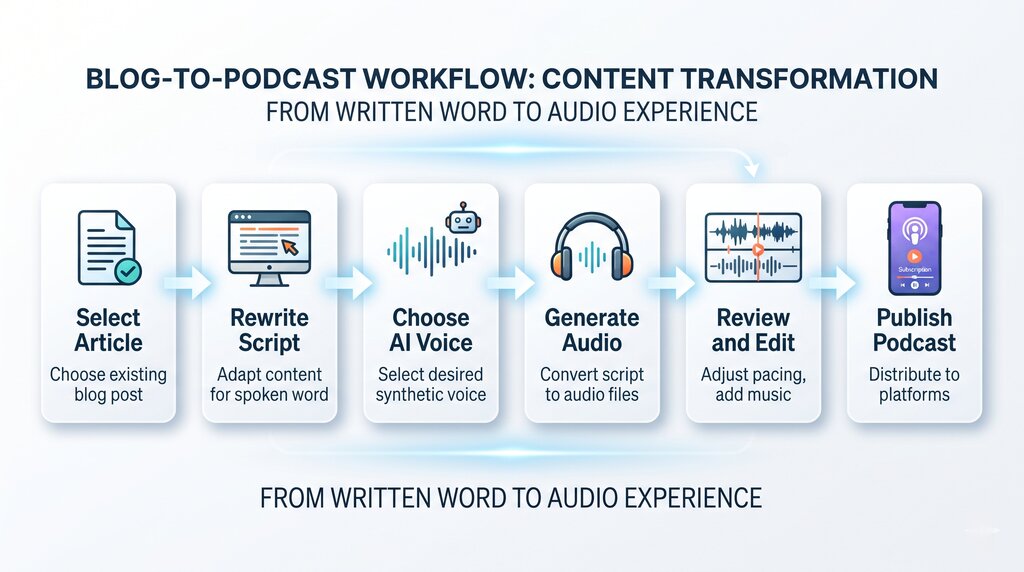
The following workflow separates content preparation, voice generation, audio review, and podcast publishing. This is important because an AI voice generator creates narration, while podcast hosting and distribution are separate parts of the process.
Step 1: Select and review your blog post
Start with one article that you want to convert.
Read it from beginning to end and identify:
- The main question it answers
- The most useful explanations
- Important examples
- Key facts and statistics
- Sections that are unnecessary for audio
- Information that needs updating
Do not simply copy the article into an audio tool.
Your first task is to decide what listeners actually need to hear.
Step 2: Create an audio-friendly outline
Use the original article as a reference and prepare a new outline.
A simple educational podcast episode might follow this structure:
- Short opening
- Introduction to the topic
- Main explanation
- Three to five useful points
- A practical example
- Important limitations or mistakes
- Summary and closing
This structure is only a starting point. A storytelling episode, interview-based episode, or news-style episode may need a different approach.
The purpose of the outline is to create a logical listening experience.
Step 3: Rewrite the article as a spoken script
Now convert the selected information into natural language.
Focus on:
- Short and clear sentences
- Direct explanations
- Conversational introductions
- Smooth transitions
- Simple descriptions of charts and examples
- A useful closing
Avoid unnecessary repetition and long lists of keywords.
Also, do not add claims that were not present in the original article unless you have checked and verified the new information.
Step 4: Add an opening and closing
Your podcast should feel like a complete episode rather than an article being read aloud.
A simple opening can include:
- The podcast or series name
- The episode topic
- A short reason to listen
- A brief introduction
For example:
“Welcome to the Digital Learning Podcast. Today, we are discussing how AI voice technology can help content creators produce audio versions of their written articles. We will look at the preparation process, voice selection, and the important checks to complete before publishing.”
A closing might say:
“That brings us to the end of today’s episode. If you found this discussion useful, you can explore the related article on our website for more details. Thanks for listening, and we will see you in the next episode.”
If you use the same podcast name regularly, keep your opening and closing consistent without making them unnecessarily long.
Step 5: Choose a suitable AI voice
Once the script is ready, select a voice that matches your subject and audience.
Think about the listening experience rather than choosing a voice only because it sounds impressive.
For example:
| Podcast type | Voice characteristics to consider |
|---|---|
| Educational | Clear, steady, easy to understand |
| Business | Professional and confident |
| Technology explainer | Articulate and conversational |
| Storytelling | Expressive with natural pacing |
| General information | Friendly and balanced |
Listen to a preview before generating the complete episode.
Check whether the voice handles your language, accent, names, and technical terminology correctly.
Step 6: Generate the narration
Use your selected text-to-speech service to convert the prepared script into audio.
For a long episode, consider generating the narration in separate sections.
For example:
- Introduction
- Main topic
- Practical example
- Common mistakes
- Conclusion
This makes it easier to regenerate one section if the pronunciation or pacing is incorrect.
It also helps you review the episode in smaller parts.
Step 7: Listen to the complete audio
Never assume the generated audio is correct simply because the text was correct.
Listen to the complete narration and check:
- Are any words pronounced incorrectly?
- Are there unnatural pauses?
- Does the voice sound too fast?
- Are technical terms understandable?
- Are sentences missing?
- Does the introduction flow naturally?
- Does the episode end properly?
If you find a problem, correct the script or available pronunciation settings and regenerate the relevant section.
Step 8: Edit and prepare the final audio
Depending on your production workflow, you may use an audio editor to arrange sections, adjust volume, remove unwanted gaps, and add an opening or closing sound.
Keep background music low enough that it does not compete with narration.
Use music and sound effects only when you have the appropriate rights or licences. Do not assume that music available online is free for podcast use.
Also, avoid adding unnecessary effects. A clear and comfortable voice is more important than a complicated audio production.
Step 9: Prepare episode information
Before publishing, prepare the details that listeners will see.
These usually include:
- Podcast show name
- Episode title
- Episode description
- Episode artwork, if required
- Episode number, if you use numbering
- Relevant category and metadata
- Transcript or show notes, where supported
Use an episode title that clearly explains the subject.
For example:
“How AI Voices Turn Blog Posts into Podcasts”
Step 10: Upload and publish through a podcast host
A voice generator and a podcast host serve different purposes.
Your AI voice tool generates the narration. A podcast hosting service stores and serves your episode and generally provides an RSS feed for distribution.
Upload the finished episode to your chosen host and complete the required show and episode information.
After publishing, submit or connect your podcast to the listening platforms you want to reach.
A Practical Example: Turning One Article into an Episode
Let’s understand the process with a simple example.
Imagine you have published a blog post titled:
“5 Ways AI Voice Technology Helps Content Creators”
The original article contains an introduction, five sections, examples, and a conclusion.
Instead of reading every paragraph exactly as written, you can turn it into a focused podcast episode.
Original blog structure
| Blog section | Podcast adaptation |
|---|---|
| Introduction to AI voices | Short conversational opening |
| Benefits of AI narration | Explain the most useful benefits |
| Content creation examples | Include two or three practical examples |
| Voice selection tips | Explain how to choose a suitable voice |
| Limitations | Discuss quality and review requirements |
| Conclusion | Summarise the episode and invite listeners to explore more |
Example: Rewriting the introduction
Original blog version:
“AI voice technology is becoming an important part of digital content production. Content creators use text-to-speech tools to generate narration for videos, educational material, marketing content, and other digital formats.”
Adapted podcast version:
“Creating audio content can take time, especially when you need narration for several videos or educational resources. This is one reason AI voice technology has become useful for content creators. In this episode, we will explore five ways AI-generated voices can support everyday content production.”
Notice that the podcast version introduces a situation and then tells listeners what they will learn.
Example: Adapting a list
Original blog version:
“AI voice technology can be used for video narration, online learning, social media content, product explanations, and multilingual audio.”
Adapted podcast version:
“Let’s look at a few practical uses. A video creator can use AI narration for an explainer video. An educator can prepare spoken versions of lessons. A business can create audio explanations for its products. These are different use cases, but they all begin with preparing clear written content.”
The information is similar, but the audio version connects the points instead of reading a list.
Example: Adding a listener-friendly ending
“AI voices can help creators prepare narration more efficiently, but the generated audio still needs review. Choosing the right voice, preparing a natural script, and checking pronunciation can make a real difference to the final result. If you want to explore the topic further, you can read the complete guide on our website.”
This gives the episode a natural ending and connects the audio to the original article.
How to Publish and Distribute Your Podcast
Once your narration is ready, the next task is making it available to listeners.
This is an important distinction: an AI voice generator helps create the audio, but a podcast hosting and distribution setup makes the episode available through podcast applications.
What is a podcast host?
A podcast host stores your episode files and provides the information needed to distribute your show.
Many hosting services create an RSS feed for your podcast.
An RSS feed is a structured file containing information about your show and its episodes, including titles, descriptions, artwork, and audio links.
Podcast applications use this feed to discover your episodes and display them to listeners.
Basic publishing process
A typical process looks like this:
- Create a podcast show with a hosting provider.
- Add your show name, description, artwork, and other details.
- Upload your finished audio episode.
- Add the episode title, description, and relevant metadata.
- Publish the episode and obtain your RSS feed.
- Submit or connect the feed to the podcast platforms you want to use.
- Check that your episode appears correctly.
The exact steps depend on your hosting provider and the platform.
Publishing on Spotify
Spotify for Creators provides tools for hosting and managing podcasts.
When a podcast is hosted with Spotify for Creators, its RSS feed is created after the first episode is published. Spotify makes hosted shows available on Spotify, while distribution to other platforms requires additional steps.
You can read Spotify’s official guidance on finding and enabling your RSS feed and distributing your show to other platforms.
Publishing on Apple Podcasts
Apple Podcasts accepts podcast submissions through Apple Podcasts Connect.
If you use an external hosting provider, you can submit your show’s RSS feed. Apple checks technical requirements, including the required feed information, artwork, and episode media.
Apple also requires at least one episode for a show to be available.
How Speakatoo Can Help with Podcast Narration
Once your blog post has been rewritten into an audio-friendly script, you need a suitable voice to narrate it.
This is where AI text-to-speech tools can help.
Speakatoo Text to Speech allows users to convert written text into spoken audio using supported AI voices and languages.
For content creators preparing podcast narration, the platform can be used to:
- Convert a prepared script into spoken audio.
- Explore different available voices.
- Preview voice output before generating the complete narration.
- Adjust available voice settings to suit the content.
- Prepare narration for articles, tutorials, explainers, and other audio projects.
A simple Speakatoo narration workflow
- Visit the Speakatoo Text-to-Speech page.
- Select a supported language.
- Explore the available voices and preview suitable options.
- Paste your podcast-ready script into the text editor.
- Adjust the available voice settings.
- Generate the audio.
- Listen to the output and check pronunciation and pacing.
- Download the generated audio in a supported format.
For a long episode, you may find it easier to prepare and generate separate sections before arranging them in an audio editor.
What Speakatoo does and does not do
It is useful to understand the difference between narration and podcast production.
Speakatoo can help generate spoken audio from your script. However, selecting a podcast topic, rewriting the article, editing the complete episode, adding licensed music, creating a podcast RSS feed, hosting episodes, and submitting them to directories are separate tasks.
This gives creators the flexibility to use an AI voice generator as one part of their podcast workflow.
Final Checklist Before Publishing
1. Can I turn a blog post into a podcast using AI voices?
Yes. You can adapt your blog post into a spoken script and use an AI text-to-speech tool to generate narration. After reviewing and editing the audio, you can upload it to a podcast hosting service and distribute it through supported platforms.
2. How do I convert a blog article into a podcast?
Start by selecting an article that works well as audio. Rewrite it using conversational language, prepare an introduction and conclusion, choose an AI voice, generate the narration, and review the complete audio before publishing it.
3. Do I need to rewrite my blog post before generating audio?
It is recommended. Blog articles often contain long sentences, visual references, and headings designed for reading. Adapting the content into shorter sentences with natural transitions usually creates a better listening experience.
4. Can AI voices sound natural in podcasts?
AI voices can produce natural-sounding narration, but the result depends on the voice, language, script, and settings. Reviewing pronunciation, pauses, and pacing is important before publishing.
5. How long should an AI-narrated podcast episode be?
There is no fixed duration. It depends on the subject, audience, and amount of useful information. A focused topic may work as a short episode, while a detailed educational discussion may need more time. Avoid adding unnecessary content just to increase the duration.
6. Can I use the same AI voice for every podcast episode?
Yes. Using a consistent voice can help create a recognisable listening experience for a podcast series. Choose a voice that suits your subject and audience, and check that it handles all your episode topics comfortably.
7. Can I add background music to an AI-generated podcast?
Yes. You can add suitable background music during audio editing. Make sure you have permission or the appropriate licence to use the music, and keep its volume low enough that it does not interfere with narration.
8. Do I need a podcast hosting service after generating the audio?
If you want to distribute your show through podcast applications using an RSS feed, you generally need a podcast host or another suitable RSS hosting arrangement. An AI voice generator creates the narration; it does not automatically host and distribute the podcast.
9. Can I publish AI-generated podcasts on Spotify and Apple Podcasts?
AI-narrated audio can be submitted through the relevant podcast publishing arrangements, provided it meets each platform’s current technical and content requirements. You should check the latest platform rules before publishing and ensure you have the rights to all audio and other material used.
10. Can I turn one blog post into multiple podcast episodes?
You can, if the article covers several substantial topics that can each stand alone. However, avoid splitting a short article into multiple episodes just to increase the number of publications. Each episode should offer enough useful information.
11. Can Speakatoo convert blog posts into podcast audio?
Speakatoo provides text-to-speech functionality that can convert prepared written scripts into spoken audio. You can select a suitable supported voice, adjust available settings, and generate narration. Podcast editing, hosting, RSS setup, and distribution are separate steps.
Conclusion
Turning blog posts into podcasts using AI voices is a practical way to give existing content another format and reach people who prefer listening.
The process starts with selecting the right article. Then you adapt the writing for audio, prepare a natural script, choose a suitable AI voice, generate the narration, and review the complete episode.
But creating the audio is only one part of podcast production. You also need to consider editing, episode information, hosting, RSS feeds, and distribution.
The most important point is to avoid treating a podcast as a simple spoken copy of a blog post. A good episode should feel natural to listen to, explain its ideas clearly, and provide value even when the audience is not looking at a screen.
AI text-to-speech tools such as Speakatoo can help with the narration stage. With a well-prepared script and a careful publishing process, your existing articles can become the foundation of a useful audio content library.