


Imagine creating a useful video in English and sharing it with people in India, France, Germany, Japan, or other countries. Your video may contain valuable information, but viewers who do not understand English might struggle to follow it.
You could translate the content, add subtitles, or create a dubbed version in another language. But which option should you choose?
This is where AI video localization becomes useful.
AI-powered tools have made it easier for creators and businesses to prepare videos for audiences who speak different languages. Instead of producing every version manually, creators can use AI for tasks such as translation and voice generation, while reviewing the final content to maintain its meaning and quality.
However, translation, subtitles, dubbing, and localization are not the same thing. Each serves a different purpose, and the right choice depends on your audience, video type, budget, and content goals.
In this guide, we will explain what AI video localization means, compare translation, subtitles, and dubbing, explore their advantages and limitations, and show you how to choose the right approach for your videos in 2026.
What is AI Video Localization?
AI video localization is the process of adapting video content for people who speak different languages or belong to different cultural backgrounds, using artificial intelligence to support parts of the work.
The goal is not simply to translate the words spoken in a video. It is to make the content understandable, natural and relevant to viewers in another language.
For example, imagine that you create an English-language tutorial explaining how to use a software application. You want viewers in India, Spain and Japan to understand the same tutorial.
You could:
- Translate the original script into Hindi, Spanish, and Japanese.
- Add subtitles in those languages.
- Generate voiceovers in the translated languages.
- Adjust examples, measurements, or expressions where necessary.
- Translate the video title, description, and other relevant information.
These activities help make the video suitable for different audiences.
What does AI do in video localization?
AI can assist with several parts of the process, depending on the tools being used.
- Speech recognition: Converts spoken words from the original video into text.
- Text translation: Changes the original script into another language while attempting to preserve its meaning.
- AI voice generation: Converts translated text into spoken audio using a selected synthetic voice.
- Subtitle generation: Helps create translated captions or subtitle files.
- Audio synchronization: Helps editors match the translated voiceover with the timing of the original video.
- Quality checking: Helps identify possible pronunciation, translation, or timing problems, although human review is still important.
Not every AI tool provides all these features. Some focus on translation, others on text-to-speech, and specialized video platforms may combine several steps.
The important point is that AI can reduce manual work, but the final video still needs proper review.
Why is Video Localization Important in 2026?
Video has become an important way for people to learn, discover products, follow creators, and understand new ideas.
However, language can prevent viewers from enjoying content even when the topic is relevant to them.
For example, a person may be interested in a software tutorial but leave the video because the explanation is available only in a language they do not understand comfortably.
Localization helps reduce this problem.
Reach audiences beyond your original language
If your video is available only in English, your content may be difficult to understand for people who prefer Hindi, Bengali, Tamil, Spanish, or other languages.
Providing additional language options can help more people understand your message.
Improve the viewing experience
Some viewers prefer reading subtitles, while others would rather listen to someone speaking in their own language.
Providing suitable language options gives viewers more control over how they consume your content.
Make educational content easier to understand
Online courses, tutorials, training videos, and educational explanations often contain important information.
When viewers understand the language comfortably, they can focus more on the subject instead of trying to translate every sentence mentally.
Support international businesses
Businesses that sell products or services in different countries may need localized product demonstrations, advertisements, onboarding videos, and customer education materials.
A localized video can make product information easier to understand for potential customers.
Help creators reuse existing content
You do not always need to record an entirely new video for every language.
With translated scripts and additional audio tracks, you may be able to adapt an existing video for another audience while keeping its original visuals.
YouTube has also expanded its multilingual features. In its September 2025 announcement, the platform reported that creators using multi-language audio tracks saw more than 25% of their watch time come from views in a video’s non-primary language, on average. This is an observation from those creators, not a guaranteed result for every channel.
Source: YouTube – Unlock a world of viewers with multi-language audio.
Translation vs Subtitles vs Dubbing: Understanding the Difference
Translation, subtitles and dubbing are closely connected, but they solve different problems.
Understanding the difference will help you select the right method for your content.
What is Video Translation?
Video translation means converting the spoken or written content of a video from one language into another.
For example:
Original language: English
Translated language: Hindi
Original sentence:
“Artificial intelligence is changing the way businesses communicate with customers.”
Hindi translation:
“आर्टिफिशियल इंटेलिजेंस व्यवसायों के ग्राहकों से संवाद करने के तरीके को बदल रहा है।”
The translated text communicates the same basic information in another language.
However, translating the script does not automatically change the audio or create subtitles. The translated text needs to be used in another format, such as subtitles or a voiceover.
Advantages of video translation
- Makes the original message understandable in another language.
- Provides the text needed for subtitles or dubbing.
- Helps businesses adapt product information for different markets.
- Can save time compared with manually rewriting every script.
Limitations
- Direct translation may not sound natural.
- Idioms and cultural expressions may need adaptation.
- Technical terms may require human review.
- Translation alone does not produce a finished localized video.
Translation is usually the starting point for a multilingual video project.
What Are Video Subtitles?
Subtitles display translated dialogue as text on the screen while the original audio continues playing.
For example, imagine watching an English video with Hindi subtitles. The speaker continues talking in English, but the Hindi translation appears at the bottom of the screen.
<AsyncImage query=”video player screenshot style example person presenting educational video with clear Hindi subtitles along bottom, generic no logos” aspectRatio=”16:9″ width=”100%” />
This allows viewers to understand the message without changing the original voice.
Subtitles are particularly useful for tutorials, interviews, documentaries, educational videos, and social media content.
Advantages of subtitles
- Usually less expensive than producing a fully dubbed version.
- Preserve the original speaker’s voice and personality.
- Allow viewers to follow content in another language.
- Can be prepared using translated text and subtitle tools.
- Work well for videos where the original voice is important.
Limitations of subtitles
- Viewers need to read while watching.
- Long sentences may be difficult to read quickly.
- Poor timing can make subtitles confusing.
- Text may cover important visual information.
- Some viewers may prefer listening rather than reading.
It is also important to understand the difference between subtitles and captions.
Subtitles generally display spoken dialogue. Captions can also include relevant non-speech sounds, such as music, laughter, or background noises, and may be designed to improve accessibility for viewers who are deaf or hard of hearing.
What is Video Dubbing?
Video dubbing replaces or adds spoken audio in another language.
For example, a creator records an English tutorial and wants viewers to hear it in Hindi. Instead of reading subtitles, viewers can listen to a Hindi voiceover.
<AsyncImage query=”professional video editor screen with original video and separate dubbed voice audio tracks timeline, headphones desk” aspectRatio=”16:9″ width=”100%” />
Traditional dubbing often uses professional voice actors who record translated dialogue. AI dubbing can use synthetic voices generated from translated text or other audio inputs, depending on the platform.
Advantages of dubbing
- Viewers can listen instead of reading subtitles.
- Makes educational explanations easier to follow for some audiences.
- Can support multilingual versions of product demonstrations and training videos.
- Allows creators to offer different audio language options.
- AI voice generation can reduce the need to record every language manually.
Limitations of dubbing
- Translation errors can change the meaning.
- Synthetic voices may not reproduce the original speaker’s emotion perfectly.
- Dialogue timing may not match the video.
- Lip movements may not match the translated speech.
- Voice generation and editing may require additional work.
Dubbing is particularly useful when spoken communication is an important part of the viewing experience.
Quick comparison: Translation vs Subtitles vs Dubbing
| Feature | Translation | Subtitles | Dubbing |
|---|---|---|---|
| Main purpose | Convert content into another language | Display translated text | Provide spoken audio in another language |
| Changes original audio? | No | No | Yes, adds or replaces audio |
| Requires translated text? | Yes | Yes | Usually yes, or a translated script |
| Requires voice generation? | No | No | Yes, for an AI-generated voiceover |
| Viewer reads text? | Not necessarily | Yes | Not necessarily |
| Typical use | Preparing multilingual content | Tutorials, interviews, social videos | Courses, product videos, entertainment |
| Relative production effort | Depends on project | Often lower | Usually higher |
The best choice depends on what your viewers need. Translation prepares the language, subtitles make it visible and dubbing makes it audible.
AI Video Localization vs Traditional Video Localization
Before AI tools became widely available, producing videos in multiple languages often required translators, voice actors, recording studios, and video editors.
This process can still be useful, particularly for high-quality commercial productions. However, AI has changed how creators approach smaller and medium-sized projects.
Traditional video localization
A traditional workflow may involve:
Sending the original script to a professional translator.
Reviewing the translated script with a language expert.
Hiring voice actors for each target language.
Recording the new audio in a studio.
Editing and synchronizing the audio with the video.
Reviewing the finished version before publishing.
This approach provides more direct human control over language, performance and delivery.
However, it may require more time, coordination and budget.
AI-assisted video localization
An AI-supported workflow may involve:
- Preparing a transcript of the original video.
- Translating the transcript using an AI translation service.
- Reviewing and correcting the translated text.
- Generating audio with a suitable AI voice.
- Adding subtitles and synchronizing the audio.
- Reviewing the finished video before publishing.
This approach can reduce repetitive work and help creators prepare more language versions.
Which approach should you choose?
| Factor | Traditional process | AI-assisted process |
|---|---|---|
| Translation | Human translator | AI-assisted translation with review |
| Voiceover | Professional voice actor | Synthetic voice or human voice |
| Production time | Often longer | Can be faster |
| Cost | Often higher | Can be lower, depending on tools |
| Creative control | Direct human performance | Depends on tool and editing options |
| Emotional performance | Human interpretation | Varies by voice and system |
| Best suited for | Premium productions and complex dialogue | Tutorials, explainers, training, and scalable content |
AI is not automatically better than traditional localization. A professional voice actor may be the better choice for a dramatic advertisement, while AI voice generation may be suitable for a series of straightforward instructional videos.
Many projects benefit from a combination of both approaches.
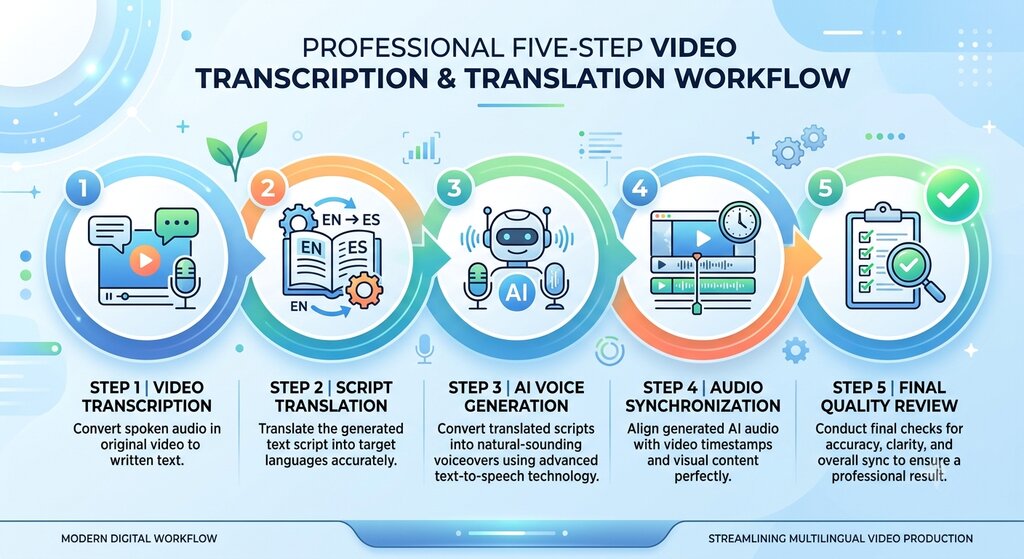
How AI Video Localization Works: Step-by-Step Process
If you want to localize a video using AI, you do not need to translate and record everything from the beginning.
A structured workflow can make the process easier.
<AsyncImage query=”clean professional infographic five stages video localization workflow transcription translation subtitles AI voice generation synchronization quality review” aspectRatio=”16:9″ width=”100%” />
Step 1: Select the original video
Start with the video you want to adapt.
It could be:
- A YouTube tutorial.
- A product demonstration.
- An online course.
- A business presentation.
- A marketing video.
- An educational explainer.
Before starting, make sure you have the necessary rights to edit and reuse the video, its audio, and any included music or other content.
Step 2: Prepare the original transcript
A transcript is the written version of the words spoken in your video.
For example:
Original audio:
“Today, we will learn how to create a professional voiceover using AI.”
Transcript:
“Today, we will learn how to create a professional voiceover using AI.”
You can prepare a transcript manually or use a speech-to-text service.
Read the transcript carefully. Correct incorrect words, names, technical terms, and sentences that may have been misunderstood by automatic speech recognition.
A clean transcript gives you a better starting point for translation.
Step 3: Translate the transcript
Choose the target language based on your audience.
For example, if your original video is in English, you may prepare Hindi, Bengali, Tamil, or Spanish versions.
Do not translate every sentence word for word without checking its meaning.
Consider the following:
- Does the translated sentence communicate the original idea?
- Is the language natural for local viewers?
- Are technical terms translated correctly?
- Are names and product references accurate?
- Is the sentence short enough for subtitles or spoken narration?
For example, an English expression may not have a direct equivalent in another language. In that case, a natural alternative may communicate the idea more clearly.
You can use an AI translation tool such as Speakatoo Text Translation to prepare translated text, followed by human review.
Step 4: Choose between subtitles and dubbing
Now decide how viewers will experience the translated content.
If you want to keep the original voice, prepare subtitles.
If you want viewers to listen in their preferred language, prepare a dubbed audio track.
You can also provide both options where the platform and project allow it.
Step 5: Generate the translated voiceover
If you choose dubbing, the translated script needs to become spoken audio.
AI text-to-speech tools can convert the translated text into speech using a selected voice.
When selecting a voice, consider:
- Language and accent.
- Pronunciation.
- Speaking speed.
- Tone and expressiveness.
- Suitability for the video’s subject.
- Consistency across the entire video.
For example, a calm and clear voice may work well for an educational tutorial, while a more energetic voice may suit a promotional video.
Listen to the generated audio before using it. Correct unusual pronunciation, incorrect names, and unnatural pauses.
Step 6: Add subtitles if required
Prepare subtitles in the target language and make sure they match the spoken content.
Pay attention to:
- Correct spelling and punctuation.
- Readable sentence length.
- Appropriate display duration.
- Accurate synchronization.
- Text placement that does not cover important visuals.
Do not put too much text on the screen at once. Viewers should have enough time to read the subtitles comfortably.
Step 7: Synchronize the translated audio
Add the translated voiceover to the video timeline.
The new audio should match the original video’s scenes and explanations.
For example, if the original speaker explains a feature while pointing to a button on the screen, the translated narration should communicate that explanation at the correct moment.
The translated speech does not always need to match every original pause exactly, but it should remain understandable and visually consistent.
Step 8: Review the complete video
Before publishing, watch the localized version from beginning to end.
Check:
- Is the translation accurate?
- Does the voice sound natural?
- Are names and technical words pronounced correctly?
- Does the audio match the visuals?
- Are the subtitles easy to read?
- Is the background music balanced?
- Does the video communicate the same message as the original?
If something feels confusing, correct it before publishing.
Step 9: Publish and measure performance
Upload the localized version or additional language tracks using the features available on your publishing platform.
After publishing, monitor audience feedback and performance.
For YouTube, you can examine available language-related analytics to understand which audio tracks are being watched and where additional localization may be useful.
Do not assume that translating a video into more languages will automatically increase views. Results depend on audience demand, content quality, discoverability, and the relevance of each language.
Limitations and Challenges of AI Video Localization
Although AI has improved multilingual content production, it still has limitations. Understanding these problems can help you avoid publishing poor-quality localized videos.
Translation may not preserve the original meaning
AI can translate sentences, but it may misunderstand context, idioms, humour, or technical language.
For example, a sentence that makes sense in English may sound unnatural when translated directly into Hindi.
How to improve it: Review important translations with a fluent speaker or qualified language professional, particularly for technical, legal, medical, and financial content.
Synthetic voices may not match the original emotion
A voiceover can pronounce the words correctly but still sound too flat, too energetic, or unsuitable for the scene.
How to improve it: Select a voice that matches the subject and review the pacing, pronunciation, and expression before publishing.
Lip synchronization can be difficult
When a person is visibly speaking in the video, translated audio may not match their lip movements.
This can make the video feel less natural.
How to improve it: Use suitable editing or dubbing tools where necessary, or select footage that does not rely heavily on close-up speaking shots.
Different languages require different speaking times
A short sentence in one language may become longer in another.
For example, the translated version may need more time to communicate the same idea.
How to improve it: Rewrite the translated script naturally while preserving its meaning. Avoid forcing the voiceover to speak unnaturally fast just to match the original timing.
Which is Better: Translation, Subtitles or Dubbing?
There is no single answer because each method serves a different audience and purpose.
Here is a practical guide.
1. Choose translation when you need to prepare content for another language
Translation is the foundation of most localization projects.
It is useful when you need to prepare scripts, product information, subtitles, or voiceover text in another language.
For example, a company may first translate its English product demonstration script into Hindi before deciding whether to add subtitles or dubbing.
2. Choose subtitles when you want a simple and affordable solution
Subtitles are a good option when:
- Your audience is comfortable reading while watching.
- You want to preserve the original speaker’s voice.
- Your video is an interview or documentary.
- You have limited production resources.
- You want to offer translated text without creating additional audio.
For example, a creator who publishes educational interviews may add Hindi and Spanish subtitles while keeping the original English conversation.
3. Choose dubbing when spoken language is important
Dubbing is useful when:
- Your audience prefers listening in their own language.
- Your video contains detailed instructions.
- You create online courses or training materials.
- You want to provide different audio language options.
- Your audience may find reading subtitles difficult or inconvenient.
For example, a software company may create a Hindi voiceover for an English product tutorial so viewers can listen to the instructions in Hindi.
How to Choose the Right Languages for Your Videos
You do not need to translate every video into ten or twenty languages immediately.
A better approach is to identify where your existing or potential audience is located and which languages they prefer.
1. Start with your audience data
If you publish on YouTube, review your available analytics to understand where your viewers come from.
Look for:
- Countries and regions where your content is watched.
- Languages your audience may prefer.
- Videos receiving interest from international viewers.
- Comments asking for subtitles or another language.
- Audience retention and watch time across available language options.
These signals can help you decide which languages to prioritize.
2. Consider the subject of your content
Different topics may have different language requirements.
For example:
- Software tutorials may benefit from English, Hindi, Spanish, or other languages depending on the users.
- Educational content may need regional-language versions.
- Product demonstrations may require localization for the countries where the product is sold.
- Entertainment videos may need subtitles or dubbing depending on viewer expectations.
3. Start with one or two languages
Instead of localizing your entire video library at once, begin with one or two languages that have clear audience demand.
Review the results before expanding.
4. Check language quality before publishing
A language version should not be published simply because an AI tool supports that language.
Check whether the translation is accurate, the voice sounds suitable, and the final content is easy to understand.
A well-reviewed version in two languages can be more useful than several poorly prepared versions.
How Speakatoo Can Help With the Video Localization Process
Creating a multilingual video involves several tasks, including translation, voice generation, editing, and final review.
Speakatoo can support specific parts of this process through its text translation and text-to-speech services.
It is important to understand that these services support the localization workflow; they should not be treated as an automatic replacement for every video editing, transcription, dubbing, or synchronization task.
1. Use Speakatoo Text Translation for translated scripts
Before creating subtitles or a new voiceover, you need translated text.
Speakatoo Text Translation helps convert written content from one language into another.
You can use it to prepare translated scripts for:
- Educational videos.
- Product demonstrations.
- Tutorials.
- Marketing content.
- Training materials.
After translation, review the text to make sure it sounds natural and communicates the same meaning as the original.
2. Use Speakatoo Text to Speech for multilingual voiceovers
Once your translated script is ready, you can convert it into spoken audio.
Speakatoo Text to Speech allows users to generate speech from written text using AI voices.
This can be useful when you need a voiceover in another language without arranging a separate recording session.
Choose a voice that suits your content and listen to the generated audio before adding it to the video.
3. Use voice cloning when you have proper authorization
If you want to maintain a consistent voice across content, an authorized voice clone may be another option.
Speakatoo Voice Cloning can support voice-based content creation using a voice sample.
Only clone your own voice or a voice you have permission to use. Check the service’s current terms and privacy information before uploading recordings.
Example: Creating a Hindi version of an English tutorial
Suppose you have a five-minute English tutorial and want to prepare a Hindi version.
Your workflow could look like this:
- Prepare and review the English transcript.
- Translate the script into Hindi using a translation service.
- Review the Hindi text for natural language and correct terminology.
- Generate a Hindi voiceover using a suitable AI voice.
- Add the new audio to your video editor.
- Adjust the audio timing and prepare Hindi subtitles if needed.
- Watch the complete video and correct any mistakes.
- Export and publish the Hindi version using the appropriate platform features.
This workflow combines translation and voice generation with video editing and human quality checks.
Frequently Asked Questions
1. What is AI video localization?
AI video localization is the process of adapting video content for audiences who speak different languages or belong to different cultural backgrounds, using AI tools for tasks such as translation, subtitles, and voice generation. It can also involve adapting examples, titles, and other content for a particular audience.
2. What is the difference between video translation and video localization?
Video translation focuses on converting spoken or written content into another language. Video localization is broader. It includes translation and may also involve adapting subtitles, voiceovers, cultural references, examples, and other parts of the viewing experience.
3. Which is better: subtitles or dubbing?
Neither is always better. Subtitles are often suitable when you want to keep the original voice and provide translated text. Dubbing is useful when viewers prefer listening in their own language. The right option depends on your audience, video format, and production resources.
4. Can AI translate a video automatically?
Some AI platforms can automate several steps, such as speech recognition, translation, and voice generation. However, the features vary between services. Translation and generated audio should be reviewed before publishing because errors can occur.
5. Is AI dubbing better than traditional dubbing?
AI dubbing can be faster and more scalable for many types of content. Traditional dubbing can offer more control over acting, emotion, character performance, and timing. The better choice depends on the project’s budget, audience expectations, and quality requirements.
6. Can I use AI voiceovers for multilingual YouTube videos?
Yes. You can prepare translated scripts and generate voiceovers in supported languages using AI text-to-speech services. You can then edit the audio and upload it using the multi-language audio features available to your channel, subject to YouTube’s current requirements.
7. Does YouTube automatically translate and dub every video?
No. Automatic dubbing depends on eligibility, supported languages, and other platform requirements. Some videos may not qualify, and generated dubs can contain errors. Check the current YouTube help documentation for availability and limitations.
8. Do subtitles improve video accessibility?
Subtitles can help viewers understand spoken content in another language and can be useful in situations where audio cannot be played. Captions may provide additional information about non-speech sounds and are particularly relevant for viewers who are deaf or hard of hearing. Good timing and readability are important.
9. How many languages should I use for video localization?
Start with one or two languages that match your audience demand. Review your analytics, viewer feedback, and content goals before expanding. There is no fixed number of languages that works for every creator or business.
10. Can I create a multilingual voiceover without hiring voice actors?
Yes. AI text-to-speech tools can generate voiceovers from translated scripts, so a separate recording session may not be necessary for every language. However, professional voice actors may still be a better choice for projects that need detailed emotional performance or specific character voices.
11. What is the difference between subtitles and captions?
Subtitles generally display spoken dialogue, often translated into another language. Captions can also include relevant non-speech sounds, such as music, laughter, and sound effects. Captions are especially useful for accessibility.
12. Can Speakatoo help with AI video localization?
Speakatoo can support parts of the localization workflow through its Text Translation and Text to Speech services. Users can prepare translated scripts and generate voiceovers from text. Video editing, audio synchronization, subtitle timing, and final quality checks may require additional tools and work.
Final Thoughts
AI video localization has made it easier for creators and businesses to prepare content for audiences who speak different languages.
However, translation, subtitles and dubbing serve different purposes.
Translation helps communicate the original message in another language. Subtitles make that message visible on the screen. Dubbing allows viewers to listen to the content in another language. Full localization brings these elements together and adapts the viewing experience for the target audience.
You do not need to use every method for every video. Start by understanding your audience, choose the most suitable approach, and review the final content carefully.
AI can make the process faster, but accurate translation, natural speech, suitable timing, and human review are what make a localized video genuinely useful.
The best localized video is not simply one that uses another language. It is one that helps people understand the same message comfortably, wherever they are and whichever language they prefer.