


Introduction
If you have listened to an AI voice recently, you may have noticed something different.
The voice does not always sound like a machine reading a script anymore. It can pause between sentences, change its tone, speak faster or slower and even sound excited, calm, friendly, or serious depending on the content.
This is one of the biggest changes in text-to-speech technology.
A few years ago, AI voices were mostly useful when the main goal was to turn text into understandable audio. Today, the focus is much bigger. AI voice technology is trying to make speech sound more natural, expressive and suitable for real-world content.
So, why do AI voices sound more human in 2026?
The answer comes down to several improvements working together. Modern AI voice systems are getting better at understanding written text, handling pronunciation, controlling pauses, changing speaking speed, adding emotion and creating more natural speech patterns.
In this article, we will look at the main reasons behind this change and how creators can use these improvements to create better voiceovers.
What Makes an AI Voice Sound Human?
A human voice is not just about saying the right words.
Think about how you speak to a friend.
You may slow down when explaining something important. You may become more excited when talking about something you like. You may pause before answering a question. You may change your tone when asking something or making a joke.
These small changes make speech feel natural.
AI voices need to do something similar.
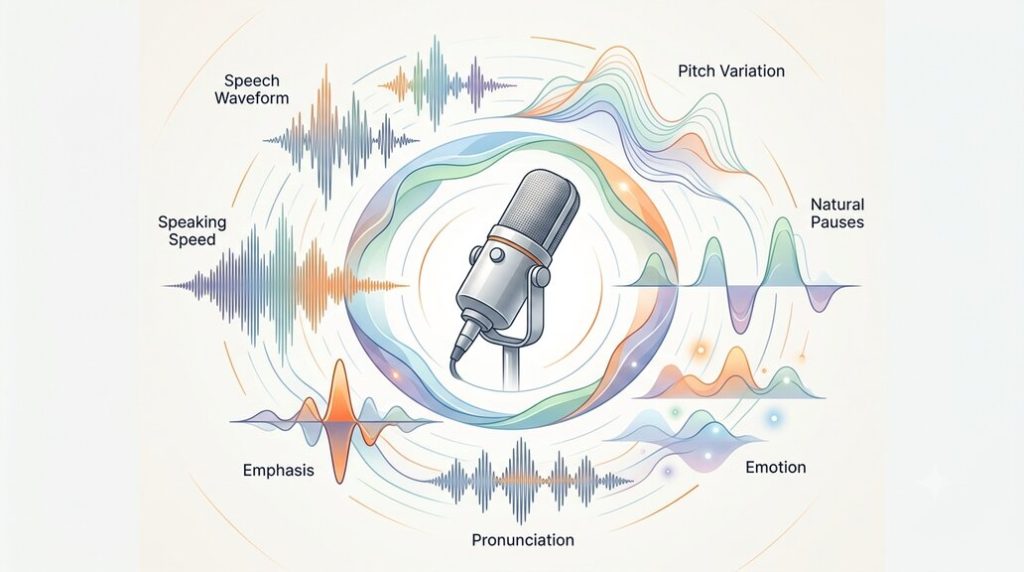
A natural-sounding AI voice usually depends on several things:
- Clear pronunciation
- Natural pauses
- Good speaking speed
- Changes in pitch
- Correct emphasis
- Suitable emotion
- Smooth sentence flow
- Consistent voice quality
When these elements work together, the result can sound much closer to a real voice.
How Has Text-to-Speech Improved?
Traditional text-to-speech was mainly focused on one simple task:
Take written text and turn it into speech.
That was already useful for screen readers, navigation systems, announcements, and other applications.
But reading text aloud is not the same as speaking naturally.
A person does not give every word the same amount of attention. Some words are emphasized, some are spoken quickly, and others are followed by a pause.
Modern AI voice technology has become much better at handling these differences.
Instead of treating the script as a simple list of words, newer systems can use the structure and meaning of the text to create more natural delivery.
This is one reason modern AI voices feel very different from older robotic voices.
1. Better AI Models Create More Natural Speech
One of the biggest reasons for better AI voices is the improvement in AI and machine learning models.
Modern speech systems are trained using large amounts of recorded human speech. From this data, the models learn patterns in how people pronounce words, connect sentences, change their tone, and control their speaking speed.
This helps the AI create speech that has more variation.
For example, an older voice might read this sentence almost the same way every time:
“That is a great idea.”
A newer AI voice can change the delivery depending on the selected style or emotion.
It might sound excited, friendly, serious, or calm.
The words are the same, but the way they are spoken changes.
That difference is a major part of what makes an AI voice feel more natural.
2. Natural Pauses Make a Big Difference
One of the easiest ways to notice a robotic voice is to listen to its pauses.
A human speaker naturally stops between thoughts.
For example:
“Before we start, let’s look at the most important part.”
There is normally a small pause after “start.”
Without that pause, the sentence can sound rushed.
Pauses are useful because they give listeners time to understand what was just said. They can also make important information stand out.
Modern AI voice tools provide better control over pauses and timing. Speakatoo, for example, includes pause and breathing controls that can be used to make voiceovers sound more natural.
This can be especially useful for:
- YouTube videos
- Audiobooks
- Educational content
- Advertisements
- Podcasts
- Storytelling
The right pause can sometimes make a bigger difference than changing the voice itself.
3. Speaking Speed Is More Flexible
People do not speak at exactly the same speed all the time.
We may speak quickly when something is familiar or exciting. We may slow down when explaining an important point.
AI voices are becoming better at handling this type of variation.
For example, a short promotional video may need a faster and energetic voice.
An educational video may need a slower pace so viewers can follow the information.
An audiobook may need a more relaxed pace.
This is why voice speed is an important part of natural-sounding TTS.
Speakatoo allows users to adjust the speed of generated speech along with pitch and volume, giving creators more control over how the final voiceover sounds.
4. Pitch Helps Add Expression
Pitch is another important part of human speech.
Imagine someone saying:
“Really?”
The meaning can change depending on the pitch.
It could sound surprised, curious, doubtful, excited, or even sarcastic.
If an AI voice uses exactly the same pitch pattern for every sentence, it can quickly sound robotic.
Modern AI voice systems can create more pitch variation and provide controls that allow creators to adjust the voice.
However, more variation does not always mean better speech.
The goal is to use the right amount of variation for the content.
A business presentation may need a controlled voice, while a storytelling video may benefit from more expression.
5. Emotion Makes AI Voices More Expressive
Emotion is one of the areas where AI voices have improved significantly.
A sentence can sound completely different depending on the emotion behind it.
For example:
“Welcome to our channel!”
A cheerful voice might sound energetic.
A calm voice might sound relaxed.
A serious voice might sound professional.
This is useful because different types of content need different styles.
A YouTube creator may want a friendly voice.
An advertisement may need an energetic voice.
An educational course may need a clear and confident voice.
A meditation video may need a calm voice.
Speakatoo currently provides different voice styles and emotional options, including cheerful, empathetic, excited, friendly, hopeful, serious, sad, whispering, and other styles.
The important thing is not to add emotion everywhere.
The emotion should match the message.
6. Pronunciation Has Become More Accurate
A voice can sound very good and still feel unnatural if it pronounces an important word incorrectly.
This is a common problem with:
- Names
- Brand names
- Medical terms
- Technical words
- Abbreviations
- Foreign words
- Place names
Imagine creating a video about a company and the AI voice keeps pronouncing the company name incorrectly.
Even if everything else sounds natural, the mistake will stand out.
This is why pronunciation controls are becoming an important part of modern text-to-speech tools.
Speakatoo provides custom pronunciation controls for names, brands, abbreviations, and difficult words.
This gives creators a way to correct words instead of changing the entire voice.
7. AI Is Getting Better at Understanding the Script
The same sentence can have different meanings depending on the situation.
For example:
“That’s interesting.”
It could be genuine excitement.
It could be surprise.
It could even be sarcasm.
The written sentence itself does not tell us everything about how it should sound.
Modern AI voice systems are becoming better at using the context of the text and the selected speaking style to create more appropriate delivery.
This is an important step because natural speech depends on meaning, not just pronunciation.
8. Punctuation Can Change the Way a Voice Sounds
Punctuation may look like a small part of writing, but it can affect voice generation.
Compare:
“Let’s start the video.”
with:
“Let’s start the video!”
The second sentence naturally feels more energetic.
Similarly, commas and other punctuation marks can help separate ideas and create more natural sentence flow.
This is why a script written for AI voice generation should not simply be a block of text copied from a webpage.
It should be written with listening in mind.
9. Breathing Can Make a Voice Feel More Natural
Human speakers naturally breathe while talking.
These breathing patterns are usually subtle, but they can make spoken audio feel more realistic.
AI voice platforms are beginning to offer more control over this area as well.
Speakatoo includes human-like breathing and pause options that can be used when creating expressive voiceovers.
However, breathing should be used carefully.
Too much breathing can become distracting.
The goal is not to make the AI voice sound like it is constantly trying to prove that it is human. Small details are usually more effective.
10. Voice Styles Give Creators More Control
Not every project needs the same type of voice.
A single voice style cannot work equally well for every situation.
For example:
| Content | Suitable voice style |
|---|---|
| YouTube tutorial | Friendly and clear |
| Business presentation | Professional |
| Advertisement | Energetic |
| Audiobook | Expressive |
| Meditation | Calm |
| News content | Clear and serious |
| Children’s story | Friendly and playful |
| Online course | Natural and easy to follow |
Modern AI voice platforms give creators more options instead of forcing everyone to use the same basic delivery.
Speakatoo, for example, lets users explore styles ranging from friendly and conversational to professional, energetic, calm, dramatic, and storytelling voices.
Why the Script Still Matters
Even the best AI voice cannot completely fix a poorly written script.
This is something many beginners overlook.
If the script is full of very long sentences, complicated wording, and awkward punctuation, the final voiceover may still sound unnatural.
Compare these two sentences:
“Users are required to complete the registration process prior to accessing the platform.”
and:
“You need to register before you can use the platform.”
The second sentence sounds more natural when spoken.
For AI voiceovers, simple writing is often better.
Try to:
- Use shorter sentences
- Avoid unnecessary words
- Write naturally
- Explain one idea at a time
- Use punctuation properly
- Check difficult words
- Read the script aloud before generating the audio
Good AI voice generation starts with a good script.
How to Make an AI Voice Sound More Natural
If you are creating an AI voiceover, you do not need to change everything at once.
A simple process can help.
1. Start With the Right Voice
Choose a voice that matches your content.
Do not select a voice simply because it sounds impressive in a sample.
Think about your audience and the type of message you are creating.
2. Check the Script
Read the script aloud.
If a sentence feels difficult for you to say, it may also sound awkward when generated by AI.
3. Fix Pronunciation
Check names, technical terms, brands, and unusual words before generating the final audio.
4. Adjust the Speed
Try different speaking speeds and listen to which one feels most comfortable.
5. Add Pauses
Use pauses between important ideas rather than letting the entire script run continuously.
6. Choose the Right Emotion
Use emotion when it helps communicate the message.
7. Listen Before Publishing
Always listen to the generated audio.
Do not assume that the first version is automatically the best version.
Small changes to speed, pronunciation, pauses, or emotion can make a noticeable difference.
How Speakatoo Helps Create More Natural AI Voiceovers
Speakatoo brings many of these controls together in one text-to-speech platform.
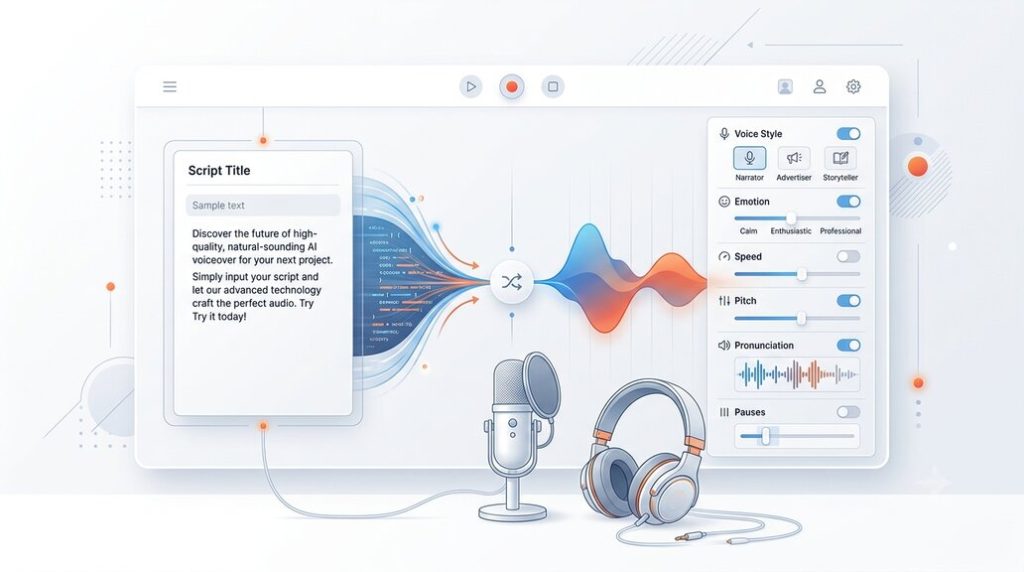
The platform currently offers 1,900+ AI voices across 130+ languages and provides controls for speed, pitch, emotion, pronunciation, pauses, accents, and breathing.
The basic process is simple:
- Add your script.
- Choose a language and voice.
- Adjust the voice settings.
- Preview the result.
- Generate the final audio.
This makes it possible to create voiceovers without recording everything manually.
For example, a YouTube creator can write a script, select a suitable voice, adjust the speed and emotion, correct the pronunciation of any difficult words, and then generate the voiceover.
Speakatoo also supports voice cloning, allowing users to create a voice from a short voice sample and use it for voice generation. The current voice-cloning service supports multilingual output and is designed for uses such as content creation, audiobooks, podcasts, advertisements, and other projects.
For anyone interested in creating AI voiceovers, you can explore Speakatoo’s text-to-speech tool to see the available voices and controls.
AI Voices are Useful for More Than YouTube
Natural AI voices are now being used in many different types of content.
- YouTube Videos: Creators can use AI voiceovers for tutorials, explainers, documentaries, reviews, and other videos.
- Podcasts: AI voices can be useful for narration, introductions, announcements, and other parts of audio content.
- E-learning: Teachers and course creators can turn lessons into audio without recording every section themselves.
- Audiobooks: Long-form narration is another area where consistent AI voices can save recording time.
- Advertisements: Businesses can create voiceovers for promotional videos, social media ads, and product presentations.
- Customer Support: AI voices can also be used for automated messages, IVR systems, and other customer communication.
The important part is choosing a voice and style that fit the specific use case.
Can AI Voices Really Replace Human Voice Actors?
Not completely.
AI voice technology has improved a lot, but human voice actors still offer something important: real human interpretation.
A professional voice actor can understand the situation behind a script and make creative decisions about delivery.
AI is different.
It is extremely useful when you need:
- Fast voice generation
- Multiple languages
- Consistent narration
- Many versions of the same content
- Quick script changes
- Large amounts of voice content
For some projects, AI voice may be the best option.
For others, a professional human voice actor may still be the better choice.
In many cases, the decision comes down to the project rather than one technology being universally better.
What Factors Should You Consider Regarding a Natural AI Voice?
If you are comparing AI voice tools, do not only listen to the first sentence.
Listen to a longer sample.
Check whether the voice:
- Pronounces words correctly
- Uses natural pauses
- Has comfortable pacing
- Changes tone when needed
- Handles long sentences well
- Sounds consistent
- Matches the emotion of the content
- Works well in your target language
Also check whether the platform gives you control over these elements.
A realistic voice is useful, but control over the voice can be just as important.
Frequently Asked Questions About AI Voices
1. Why do AI voices sound more human now?
AI voice technology has improved in areas such as pronunciation, pacing, pitch, pauses, emotion, and speaking styles. These improvements help generated speech sound less robotic and more natural.
2. What makes an AI voice sound natural?
A combination of clear pronunciation, natural pauses, suitable speaking speed, pitch changes, correct emphasis, and an appropriate emotional style can make an AI voice sound more natural.
3. What is prosody in AI voice technology?
Prosody refers to the rhythm, pitch, stress, and timing used when speaking. It helps determine how a sentence sounds rather than simply which words are spoken.
4. Can AI voices show emotions?
Yes. Many modern AI voice platforms provide different emotional or speaking styles. The available options depend on the platform and voice.
5. Can I control the speed of an AI voice?
Yes. Many TTS platforms provide speed or rate controls. Adjusting the speed can help make narration easier to follow or better suited to a particular type of content.
6. Can AI voices pronounce names correctly?
AI voices can pronounce many names correctly, but unusual names, brands, abbreviations, and technical words may need additional pronunciation settings or manual review.
7. Does punctuation affect AI voice generation?
Yes. Punctuation can influence pauses and the flow of speech. However, the exact effect depends on the TTS system being used.
8. Can AI voices be used for YouTube videos?
Yes. AI voiceovers can be used for many types of YouTube content, including tutorials, explainers, educational videos, documentaries, and promotional content. Creators should always follow the relevant platform rules and use voices and content they have the right to use.
9. What is voice cloning?
Voice cloning uses AI to create a digital version of a person’s voice from a voice sample. It can be used to generate new speech without recording every sentence manually. Voice cloning should only be used with the appropriate permission from the voice owner.
10. How can I make my AI voice sound better?
Start with a natural script, choose the right voice, check pronunciation, adjust speed and pitch, add suitable pauses, choose an appropriate emotion, and listen to the final audio before publishing.
Conclusion
AI voices have come a long way from the robotic speech many people remember.
The improvement is not because of one single feature. Better AI models, improved pronunciation, natural pauses, better pacing, pitch control, emotional styles, breathing, and other voice controls all contribute to the result.
For creators, this means AI voice generation is becoming less about simply turning text into audio and more about creating speech that fits the message.
The most natural result usually comes from a combination of good technology and good preparation.
Write the script naturally. Choose a suitable voice. Check pronunciation. Adjust the speed. Use pauses where they make sense. Add emotion when the content needs it. Then listen to the result before publishing.
Tools such as Speakatoo make this process easier by giving creators access to a large range of voices, languages, and voice controls in one place.
As AI voice technology continues to improve, the difference between simply hearing words and actually hearing a message will become even more important.